VOIP is shortened for the term Voice over Internet Protocol and is a general term used referring to the family of transmission technologies used for the delivery of voice communications over the internet (wikipedia.org). These are a few places found where you can sign up to call your family, friends, and co-workers for free, or for a lower price, over the internet. Check these out. Just sharing!
Lingo Talk
Skype (My personal favorite.)
Voip
Monday, January 25, 2010

Friday, January 8, 2010
Creative Educator
The Creative Educator is an educational magazine produced by Tech4Learning, inc. that can be subscribed to for free. Creative Educator features articles about educators and how they have used educational technology in their classrooms. This magazine is filled with ideas, tips, etc. and is really worth subscribing to if you are a teacher. If you go to their website, and click on subscribe, there is an information box for you to fill out and submit to the magazine.

Monday, December 7, 2009
Microsoft Updates
I have been amazed at how many teachers have not done microsoft updates on their computers. Then I started thinking about if I have done mine recently. It is problematic if you do not have your updates set to run automatically for microsoft. So, if you want to make sure that you have updated your microsoft software, this is what you will need to do to make sure it has been done recently. Open up a word document in microsoft word. Click on Help which is located in your Microsoft tool bar. Then click on check for updates.
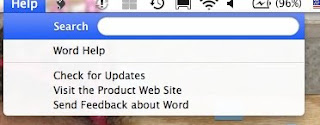
After you click on check for updates, a box will pop up that asks you How would you like to check for software updates? Make sure you click on Automatically so that the updates will be checked on a more frequent basis.
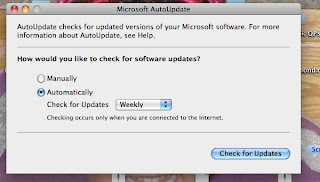
If updates have not been installed, it will take awhile for updates to be checked and installed so that your software is up to par. Thanks to Bonnie Young who is the tech teacher at Midvale Elementary. She took a minute to show me how to run an update, so I wanted to share what was shared with me.

After you click on check for updates, a box will pop up that asks you How would you like to check for software updates? Make sure you click on Automatically so that the updates will be checked on a more frequent basis.

If updates have not been installed, it will take awhile for updates to be checked and installed so that your software is up to par. Thanks to Bonnie Young who is the tech teacher at Midvale Elementary. She took a minute to show me how to run an update, so I wanted to share what was shared with me.
Wednesday, November 18, 2009
Technology Teacher Survey
Here is the link for the CSD technology survey for teachers to take in the district. The survey was created in google documents as a google form. Please make sure you click on the submit button after you fill out the survey. Thanks for taking a few minutes to answer these questions.
https://spreadsheets.google.com/viewform?formkey=dEJKOUZhdThFWDFrUjd2cmg5OHc5eFE6MA
https://spreadsheets.google.com/viewform?formkey=dEJKOUZhdThFWDFrUjd2cmg5OHc5eFE6MA
Friday, November 13, 2009
AudibleKids
AudibleKids is an audiobook website where books can be downloaded for adults and kids to listen to and read. It is a great website for parents, kids, and educators. Books can be downloaded for free through the RIF (Reading is Fundamental) program. To access free books, click on the link for audiblekids, scroll to the bottom of the page and look on the bottom left of the link, and click on the RIF logo. Books can be downloaded on your computer or MP3 player. I think that this is a great site for teachers to use in the classroom.
Wednesday, October 28, 2009
Using the AVervision Document Camera with a Smart Board
I'm thinking it is time to get on the stick and start posting again in my blog. Hopefully teachers will find this post helpful in JSD and CSD. As part of our Engaged Classroom plan last year in JSD, every EC teacher in elementary received an 300AF+ AverVision document camera from AverMedia. This past month, several teachers at Crescent Elementary had asked if there was a way for their document camera to be used with their Smart Board. After spending a few hours working with cords and looking on the internet, there is a way!!!!!!! There is software that came with the document camera and that will need to be installed on your computer. There are updated versions of the software that will need to be downloaded. Here is the link for the most recent software update depending on the model you own.
http://www.avermedia-usa.com/presentation/download.asp
This is the procedure for connecting to an interactive whiteboard.
1. You will need two VGA cables. One VGA needs to be connected from the projector's video input port to the AverVision's VGA out port, which is the blue colored port. The other VGA needs to be connected from the AverVision's VGA in port to the computer's VGA port.
2. A USB cable needs to be connected between the interactive whiteboard and the computer.
3. A separate USB cable needs to be connected between the AverVision and the computer.
4. Turn the AverVision on and make sure you have selected the "PC mode" on the camera. Once this is on, you need to open the AverVision software located in your applications folder. When this has been opened, you should be able to see the image underneath the document camera.
5. Open your tools for the interactive whiteboard, Smart tools in the applications folder if you are using a Smart board, and you are now ready to use the document camera image on your interactive whiteboard.
I did need to use a USB hub in order to have room to plug in my USB cords.

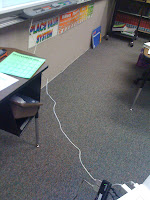
This is a shot of a USB cord connected between the laptop and the Smartboard.
http://www.avermedia-usa.com/presentation/download.asp
This is the procedure for connecting to an interactive whiteboard.
1. You will need two VGA cables. One VGA needs to be connected from the projector's video input port to the AverVision's VGA out port, which is the blue colored port. The other VGA needs to be connected from the AverVision's VGA in port to the computer's VGA port.
2. A USB cable needs to be connected between the interactive whiteboard and the computer.
3. A separate USB cable needs to be connected between the AverVision and the computer.
4. Turn the AverVision on and make sure you have selected the "PC mode" on the camera. Once this is on, you need to open the AverVision software located in your applications folder. When this has been opened, you should be able to see the image underneath the document camera.
5. Open your tools for the interactive whiteboard, Smart tools in the applications folder if you are using a Smart board, and you are now ready to use the document camera image on your interactive whiteboard.
I did need to use a USB hub in order to have room to plug in my USB cords.

This is a shot of a USB cord connected between the laptop and the Smartboard.

Monday, July 20, 2009
CSD-EMT Retreat
I was a little worried that this week was going to be long, since I have been working on the same team with Darren and Kelly in JSD, and was part of the planning for the EC program. I have actually learned a lot and the retreat has given me time to reflect and learn more about social networking and the importance it has in education. These are my thoughts about CSD Retreat (training) week.
I was very glad to have learned more about Twitter. I feel like I have a better handle of how to use Twitter as one of my new PLN's. I finally see the benefits of using Twitter and how it can help me as an educator. Most of the people that were Skyped into our trainings, were also members of the Twitter world. After using it daily with my EMT team, I have been able to send direct messages, leave notes from Skype, and connect with other educators outside of Utah. I look forward to continuing networking this new school year through Twitter.
I came away from this week with the "Big Rocks". The first would be, relationships. It is going to be very helpful for me to build relationships in my schools. In building a relationship, trust should be built, and hopefully teachers will be willing to let me in their room to help integrate technology into their curriculum. Another rock would be students. It is important that I place students first when teaching educators. It is ALL about the students!!!!! Another important rock is the importance of me being a Learner. I should be a learner as I teach others. All teachers should be learners along with their students. I think this is important to get across to teachers because the thought was that we should know everything. With the technology changing so regularly, it is hard to know everything!!!! I am very excited about working with Canyons School District and working with my new team.
I was very glad to have learned more about Twitter. I feel like I have a better handle of how to use Twitter as one of my new PLN's. I finally see the benefits of using Twitter and how it can help me as an educator. Most of the people that were Skyped into our trainings, were also members of the Twitter world. After using it daily with my EMT team, I have been able to send direct messages, leave notes from Skype, and connect with other educators outside of Utah. I look forward to continuing networking this new school year through Twitter.
I came away from this week with the "Big Rocks". The first would be, relationships. It is going to be very helpful for me to build relationships in my schools. In building a relationship, trust should be built, and hopefully teachers will be willing to let me in their room to help integrate technology into their curriculum. Another rock would be students. It is important that I place students first when teaching educators. It is ALL about the students!!!!! Another important rock is the importance of me being a Learner. I should be a learner as I teach others. All teachers should be learners along with their students. I think this is important to get across to teachers because the thought was that we should know everything. With the technology changing so regularly, it is hard to know everything!!!! I am very excited about working with Canyons School District and working with my new team.
Subscribe to:
Posts (Atom)